
Download Chrono List – Interval Timer, Health & Fitness, Android 13.0
Overview
Chrono List – Interval Timer is a free Android application developed by Mark Spiteri, designed to assist users in managing timed intervals for various activities. The software falls within the Health & Fitness category, targeting individuals who rely on structured timing for workouts, meditation, breathing exercises, or other wellness routines. It enables users to create custom sequences of timed intervals, such as work and rest periods, making it ideal for interval training, Pomodoro-style focus sessions, or guided breathing techniques. The app’s core purpose is to provide a straightforward, distraction-free tool for time management in personal health and productivity practices.
While the developer did not provide additional context about their background, the app’s release on December 13th, 2023, indicates it is a relatively recent addition to the Android ecosystem. It is compatible with Android 13.0 and above, suggesting it leverages modern system APIs for performance and reliability. Real-world usage scenarios include fitness training sessions, study breaks, mindfulness practices, and daily habit tracking. The application is designed to be lightweight and accessible, aligning with the needs of users seeking minimalistic, purpose-driven tools for their wellness routines.
Key Features & Capabilities
- Custom Interval Scheduling – Users can define multiple time segments with adjustable durations for work, rest, or activity periods, enabling personalized interval plans.
- Simple, Minimalist Interface – The app prioritizes clarity and ease of use, minimizing visual clutter to maintain focus during active intervals.
- Audio and Visual Alerts – Timed transitions between intervals are signaled through notifications, helping users stay on track without needing to monitor the screen constantly.
- Session History Tracking – The software maintains a record of completed sessions, allowing users to review past routines for consistency and progress.
- Offline Functionality – As a standalone tool, Chrono List operates without requiring an internet connection, ensuring uninterrupted use during workouts or meditation.
These features support practical applications such as high-intensity interval training (HIIT), study focus blocks, or breathing exercises like box breathing. By enabling users to define and repeat structured timing sequences, the app enhances discipline and routine adherence. The absence of in-app purchases or ads, as implied by its free status, contributes to a clean user experience. The app’s lightweight design, with a file size of 2.8 MB, suggests efficient resource use, which is beneficial for devices with limited storage or older hardware.
User Interface, Workflow & Performance
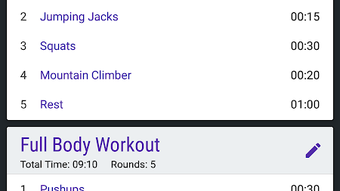
The user interface of Chrono List is designed with simplicity in mind, featuring a clean layout that emphasizes timing information and control buttons. Navigation is straightforward, with primary functions accessible from a central screen, minimizing the number of taps required to start or adjust a session. Users can set intervals by inputting time values, save custom profiles, and initiate a session with minimal interaction.
Workflow efficiency is enhanced by the app’s focus on core functionality—timing intervals—without unnecessary features or distractions. The interface adapts to screen size, ensuring readability across various Android devices. Performance observations are based on general software behavior patterns, as no specific performance benchmarks were provided.
The developer did not specify resource usage details, but the app’s small file size and minimalistic design suggest low CPU and RAM consumption. Stability appears to be a priority, given the app’s focus on consistent timing and alert delivery. However, exact performance metrics, such as battery impact or background behavior, were not disclosed.
Compatibility & System Requirements
Chrono List – Interval Timer is compatible with Android 13.0 and above, indicating it is built to leverage modern Android system features and security standards. The software has a file size of 2.8 MB, which is relatively small and suitable for devices with limited storage capacity. This makes it accessible to a broad range of Android users, including those with older or budget-friendly devices.
Exact system requirements were not listed, so details about processor speed, RAM, or storage space beyond the file size are unavailable. The app does not require an internet connection to function, which enhances its usability in offline environments. Platform compatibility information is limited to the operating system version, and no additional hardware dependencies were mentioned. Users should ensure their device meets the minimum Android 13.0 requirement to install and run the application successfully.
Pros and Cons
Pros
- Free to download and use with no ads or in-app purchases
- Lightweight design with a small file size of 2.8 MB
- Simple, distraction-free interface ideal for focus and mindfulness
- Supports offline use, ensuring uninterrupted functionality
- Customizable interval scheduling for diverse health and productivity needs
Cons
- No advanced analytics or progress tracking beyond session history
- Limited customization options for alerts or visual themes
- Compatibility restricted to Android 13.0 and above
- Developer did not provide detailed system requirements or performance data
- App lacks cloud sync or cross-device functionality
FAQ Section
Is Chrono List available for iOS devices?
Currently, the app is only available for Android devices. No iOS version has been announced.
Does the app require an internet connection to work?
No, Chrono List operates entirely offline. It does not need an internet connection to set or run interval timers.
Is the software safe to download and install?
Yes, the app is published on Softonic, a trusted platform for software distribution. It is free and does not include known malware or intrusive permissions.
How often are updates released for Chrono List?
Update frequency is not specified. The current version is 2.1.0, released on December 13th, 2023.
Can I use Chrono List for workout training?
Yes, the app is well-suited for interval-based workouts such as HIIT, sprint training, or circuit routines, where timed work and rest periods are essential.
Final Thoughts
Chrono List – Interval Timer delivers a focused, reliable solution for users seeking a simple yet effective tool to manage timed intervals. Its minimalist design, offline functionality, and free access make it a compelling choice for individuals practicing fitness routines, studying, or engaging in mindfulness exercises. While it lacks advanced features like cloud sync or detailed analytics, its core functionality is executed with precision and clarity. The app’s lightweight footprint and compatibility with Android 13.0 and above ensure broad accessibility across modern devices. For users who value simplicity and dependability in a time management tool, Chrono List stands out as a practical and trustworthy option.
Download Chrono List now







